Some creative blocks are not about a lack of inspiration. They are about timing. You have a scene in your head, a product demo that needs a soundtrack, a short video that needs momentum, or a podcast trailer that needs an emotional hook. And then the usual process starts: searching, sorting, licensing, second-guessing, saving ten options, and still not feeling sure. In my own tests, what helps most is not “more options,” but a faster path from intent to something you can actually place on a timeline. That is the practical promise of an AI Music Generator when it is designed as a workflow, not just a novelty.
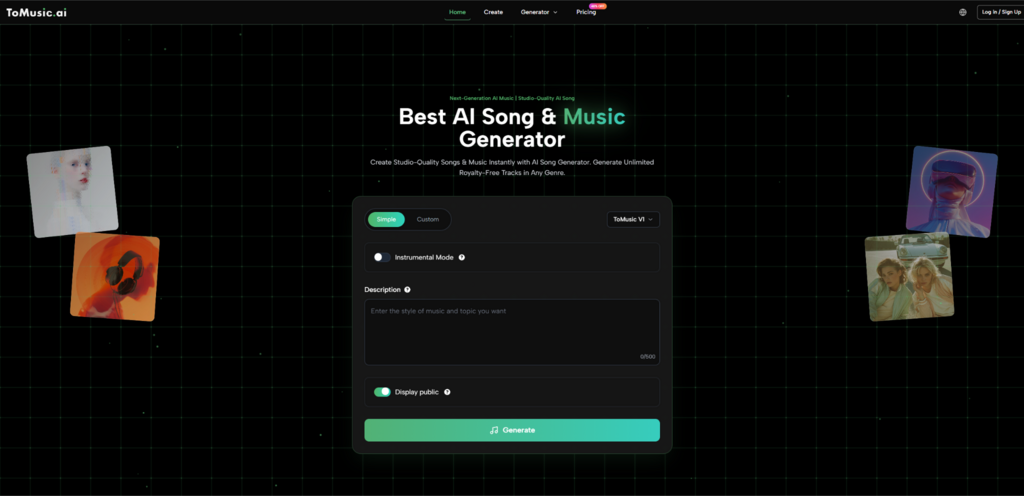
Most people underestimate how much creative energy is spent on music decisions that are not really musical decisions. They are decisions about fit: does this sound like “warm,” does it suggest “progress,” does it stop the viewer from scrolling, does it leave room for voiceover. If you can compress the distance between your words and a usable draft track, you get to keep your attention for the parts that matter. ToMusic.ai is built around that compression: text descriptions or lyrics go in, and complete songs come out, with multiple models that emphasize different strengths.
Why Speed Matters More Than Perfect Control
Speed in music generation is not just about waiting fewer seconds. It is about making your first draft real quickly enough that you can judge it with your ears instead of your imagination. When a tool can generate a coherent track from a prompt, you stop arguing with yourself about what you want and start reacting to what you hear. In practice, that reaction is where the useful edits happen: adjusting mood, tempo feel, arrangement density, or whether vocals help or distract.
ToMusic.ai positions itself as a “hub” rather than a single-style generator. It offers four models (V1–V4) and supports both prompt-based creation and lyric-driven songs. The difference between these two inputs is important: prompts help when you want a vibe; lyrics help when you need narrative and phrasing to anchor the music. If you treat these as two separate creative modes, you can use the same platform for very different jobs.
The Hidden Cost Of “Searching” Instead Of “Creating”
A typical “find a track” workflow has a surprising number of steps: search, shortlist, check licensing, test under your visuals, revise the edit, then realize the energy is wrong and repeat. You can do great work this way, but it often becomes a bottleneck for fast-moving creators.
ToMusic.ai shifts that sequence. Instead of searching an existing catalog, you describe the target, generate, then iterate. The important detail is that every generation is automatically saved to your Music Library, which functions as a personal vault with metadata like tags, lyrics, and generation parameters. That matters because iteration only becomes practical when you can keep track of what you tried and why it failed.
A Simple Comparison Of Three Common Workflows
| Workflow | What You Gain | What Usually Breaks | When It Still Makes Sense |
| Stock music browsing | Predictable quality, known licensing | Time spent searching, “almost right” tracks | Brand campaigns with fixed sonic identity |
| Loop-based beat tools | Fast rhythm drafts | Limited structure, repetitive feel | Short social clips, rough cuts |
| ToMusic.ai generation | Fast full-song drafts, prompt/lyrics flexibility, multi-model options | Output depends on prompt clarity, may need multiple runs | Creator workflows where speed and iteration matter |
What ToMusic.ai Is Actually Doing Under The Hood
At the user level, the system is straightforward: you describe what you want, choose a model, and generate. Under the surface, the “model choice” is a creative decision, because each model is tuned for different priorities. The platform describes V4 as emphasizing vocal expression and emotional nuance, while other versions cover different strengths such as longer compositions, richer harmonies, or faster generation. Even if you do not obsess over the technical details, treating models as “different studios” is a practical mental model: same idea, different production personality.
There is also a plan-related layer that affects workflow: free access is positioned around the V1 model and a limited quota, while paid plans add features like longer songs, more concurrent generations, and expanded download options. In real usage, concurrency matters more than it sounds—being able to generate multiple variations in parallel is the difference between “one long wait” and “a set of choices you can A/B quickly.”
Two Inputs, Two Mindsets
Here is a useful way to decide how to start:
Prompt-first: best when you need mood, energy, genre cues, and a general arc.
Lyrics-first: best when you have story beats, specific phrasing, or you want vocals to carry meaning.
If you are generating for video, prompt-first often gets you to a usable bed quickly. If you are generating a full “song” that should feel authored, lyrics-first often gives the output a more intentional shape.
A Practical Note About Expectations
In my testing, the tool is most reliable when you ask for fewer contradictions. “Sad but uplifting, slow but danceable, minimal but cinematic, lo-fi but pristine” reads poetic to humans but becomes messy for a generator. The best prompts specify a small number of high-impact constraints: mood, tempo feel, instrumentation, and whether you want vocals.
A Realistic 3-Step Process That Matches The Site Flow
This is the simplest workflow that stays aligned with how ToMusic.ai presents the product:
Choose your creation mode and write your intent
Decide whether you are starting from a description or from lyrics, then write a short, concrete target: genre + mood + tempo feel + key instruments.
Pick a model and generate variations
Choose from the available models (V1–V4) and generate. If you have access to higher concurrency, generate several takes at once so you can compare direction, not just quality.
Review in the Music Library and download for use
Your tracks save automatically in the Music Library with metadata. From there, you can listen, compare versions, and download in the formats supported by your plan.
Where “Text To Music” Becomes A Real Workflow
The moment I stopped thinking of this as “AI makes a song” and started thinking of it as “AI gives me drafts,” it became more useful. Drafts are supposed to be imperfect. Their job is to make the next decision obvious.
The platform’s Text to Music approach is strongest when you use it to compress the early exploration stage. For example, instead of spending an hour trying to find a track that feels “clean tech optimism,” you can generate three drafts: one more minimal, one more melodic, one more rhythmic. Then you pick the direction and refine.
This is also where “private generation” and a library-based system matter. You are not forced to publish experiments. You can keep iterations as private working files and return later, which matches how most creators actually work.
How To Write Prompts That Produce Fewer Surprises
A compact structure that tends to work:
Genre reference (not a specific artist name, but a genre family)
Mood adjectives (two max)
Tempo feel (slow / mid / fast, or “driving” vs “laid-back”)
Instrumentation (3–5 anchors)
Vocal instruction (instrumental only, or vocal style)
Example pattern (not a template you must copy):
“Mid-tempo synth-pop, bright and hopeful, steady driving beat, warm pads, crisp drums, simple melodic hook, instrumental only.”
When You Should Switch Models Instead Of Rewriting Everything
If the musical idea is right but the performance is wrong (for example, vocals feel flat or the arrangement lacks motion), switching models can be a faster lever than rewriting the entire prompt. I treat the models as different default production choices. Try the same prompt across two models before you assume your writing is the problem.
Using Lyrics Without Turning It Into A Full Studio Project
Lyrics input is where many tools become fiddly. The surprising thing is that a lyric-driven generator can still be used lightly: you do not need perfect poetry. What you need is structure—verses, a chorus idea, and a consistent tone. If you give the system a stable lyrical scaffold, it has a better chance of producing a song that feels coherent rather than a series of unrelated lines.
That is why the Lyrics to Song AI angle matters: it lets you treat words as a compositional constraint, not just a creative afterthought. For creators who already write scripts, captions, or voiceovers, lyrics become an accessible way to encode intent.
Limits You Should Expect (And Why That Is Not A Dealbreaker)
To keep expectations grounded:
Results depend heavily on prompt and lyric clarity. You may need multiple runs.
Output can vary even with the same input, which is useful for exploration but less predictable.
Sometimes you get a great chorus with an average verse, or vice versa. The workflow is to regenerate or adjust the input rather than forcing one output to do everything.
A Calm Way To Decide If It Fits Your Use Case
If your work benefits from fast drafts—content creation, early-stage marketing edits, prototype videos, personal songwriting sketches—ToMusic.ai’s model-based generation and auto-saved library can reduce friction. If you need absolute sonic consistency across a campaign, you may still prefer traditional composition or a curated library. The realistic sweet spot is using generation to find direction quickly, then committing to the version that supports your story.