Most AI creative tools drop you in front of a blank prompt field and leave you there. No reference point. No sense of what’s possible. No indication of what other creators are making with the same tools you’re about to use. The result is that you spend the first ten minutes of every session figuring out where to start instead of actually creating.
AI Video Maker changes that starting point. It’s a living feed of AI-generated content from creators using every tool on the platform — videos, images, music, voice — that doubles as a discovery engine, a prompt reference library, and a direct launchpad into your own production workflow. And you can start exploring for free, no credit card required.
Why Creative Blocks Are a Platform Problem, Not a Personal One
Creative blocks aren’t usually about a lack of ideas. They’re about a lack of context. When you open a blank tool with no reference for what good output looks like, what prompts produce what results, or what other creators are experimenting with, the gap between intention and execution feels much wider than it actually is.
Standalone AI video maker tools have no answer to this problem. They generate when prompted and do nothing when they’re not. There’s no community layer, no example library, no way to see how the same model handles different visual styles, tones, or formats. The current reality for most creators looks something like this:
- Starting every session from scratch with no reference examples
- Not knowing which model produces which visual style
- Spending time on trial-and-error prompts that an example gallery would resolve in seconds
- No visibility into trending formats or what’s performing well for other creators
- No way to take inspiration directly into production without switching platforms
The tools are capable. The problem is that they offer no bridge between what’s possible and where to start.
A Complete Creative Suite, Built Into One Platform
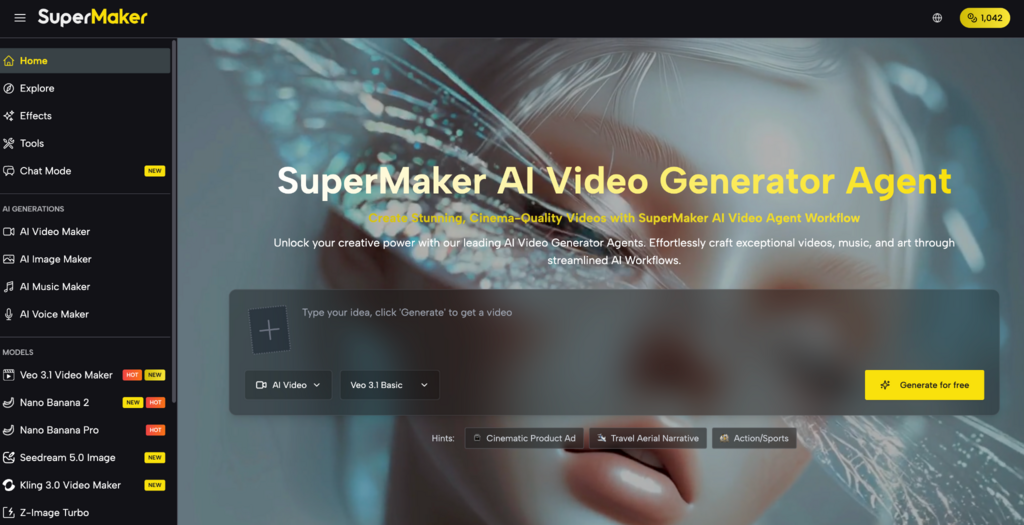
This platform connects a community discovery feed directly to a full AI video maker suite — so the content you find doesn’t just inspire you, it can be the starting point of your own project. Browse a video you like, identify the model and style that produced it, and move directly into generation without leaving the platform.
Here’s how the platform is organized:
Pre-Production: Discover and Plan
- AI Explore: Browse a continuously updated feed of AI-generated videos, images, music, and voice content created by the platform’s creator community — filter by content type, model, style, and trending format, and use any piece of content as a direct reference or remix starting point for your own project.
- AI Image Maker : Generate storyboard frames, concept art, and scene references using models like GPT Image 2, Nano Banana Pro, Seedream 5.0, and Flux Kontext — with built-in editing tools including magic erase, smart uncrop, and photo restoration — ready to import directly into the video pipeline.
Production: Generate Video, Voice, and Music
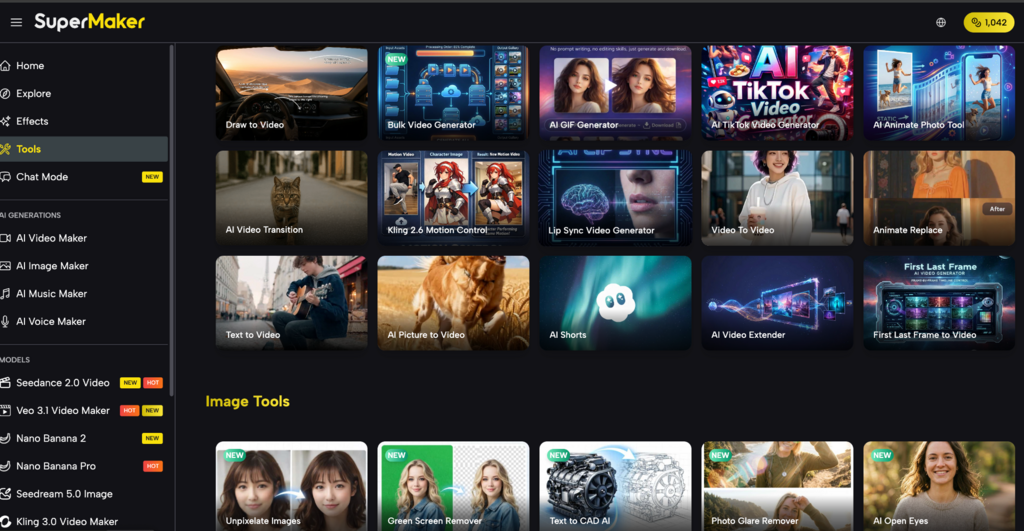
- AI Video Maker: Access 30+ industry-leading video models — including Google Veo 3.1, Kling 3.0, Seedance 2.0, and Sora — with text-to-video, image-to-video, lip-sync, first/last frame control, batch generation, and full commercial licensing on premium outputs.
- AI Voice Maker: Convert scripts into professional narration across multiple languages, accents, and voice styles — from conversational to broadcast-ready — saved natively to your asset library in seconds.
- AI Music Maker: Generate original, royalty-free background tracks from a text description, with full control over genre, tempo, and instrumentation — permanently licensed on paid plans, ready in 1-3 minutes.
Post-Production: Polish, Stylize, and Scale
- AI Effects Library: Apply 100+ one-click visual effects and trending formats — including AI Red Carpet Video, baseball fancam, sketch-to-video, and photo-to-dance — updated regularly and optimized for TikTok, Instagram Reels, and YouTube Shorts.
- AI Studio (Canvas Workflow): Chain any combination of tools into a single automated pipeline on an infinite no-code canvas — with batch processing of up to 4 variations per node, auto-save, and reusable workflow templates.
The tool runs entirely in the browser — no download, no installation required. A mobile app is also available for iOS and Android.
How to Go From Browsing to Publishing in One Session
Step 1 – Browse Explore for reference: Open the Explore feed and filter by content type or model. Identify a visual style, effect, or format that fits your creative direction.
Step 2 – Note the model and prompt style: Use the reference content to understand which model and prompt structure produces the output you want — saving the trial-and-error phase entirely.
Step 3 – Generate your own version: Move directly into the AI video maker with your chosen model pre-selected. Input your prompt and generate.
Step 4 – Add voiceover and music: Layer narration and background music from the same platform. Both save to your project library automatically.
Step 5 – Combine and export: Assemble your assets in the built-in editor and export as MP4 — ready to publish.
Real Use Cases: Social Media, YouTube, and Ads
Social Media Creators Explore surfaces trending effect formats and viral content styles before they peak — giving creators a live signal for what to produce next. Moving from discovery directly into the AI video maker in the same platform means trending content gets published while the trend is still active.
YouTube Creators New YouTube creators spend disproportionate time figuring out what visual styles work for their niche. Explore provides a reference library of real AI-generated content across every category — dramatically shortening the experimentation phase and helping creators establish a consistent visual identity faster.
Marketers and Ad Teams Explore serves as a creative brief accelerator. Instead of assembling a mood board from scattered sources, teams can filter the feed by style and format, identify the exact visual direction they want, and move directly into production — with the model and prompt approach already validated by existing outputs.
Pricing: What You Get at Each Tier
| Plan | Price | Credits | Videos | Images | Music | Voice Tracks |
| Free | $0 | 30 credits/week via check-in | Up to 1 | Up to 5 | Up to 5 generations (10 songs) | Up to 2 |
| Basic | $8.30/mo ($100/yr) | 2,400/year | Up to 240 | Up to 1,200 | Up to 1,200 generations (2,400 songs) | Up to 480 |
| Popular | $24.00/mo ($288/yr) | 9,600/year | Up to 960 | Up to 4,800 | Up to 4,800 generations (9,600 songs) | Up to 1,920 |
| Pro | $30.00/mo ($360/yr) | 21,600/year | Up to 2,160 | Up to 10,800 | Up to 10,800 generations (21,600 songs) | Up to 4,320 |
Explore is fully accessible on the free plan — no credit card required. Browse the community feed, identify your creative direction, and start generating before committing to a paid tier.
Conclusion
The blank prompt problem is one of the most underrated friction points in AI video creation. Every tool assumes you already know what you want to make — and when you don’t, the tool offers nothing. A community discovery feed connected directly to an AI video maker changes the starting point from uncertainty to reference, and from reference to finished output. The free tier requires no credit card to find out.
This platform treats discovery as the first step of production, not a separate activity that happens somewhere else. Find a format you like, move directly into the AI video maker, and publish — without the context-switching that standalone tools make unavoidable.