
Google continues to prioritize user experience as one of the strongest ranking signals. Core Web Vitals represent the most important performance metrics that determine how fast your website loads, how quickly users can interact and how stable the page feels during browsing.
If you want higher rankings, better conversions and stronger user engagement in 2026, you need a Web Vitals friendly website. In this guide, we break down the most effective and practical Core Web Vitals optimization strategies that actually work for real websites.
What Are Core Web Vitals?
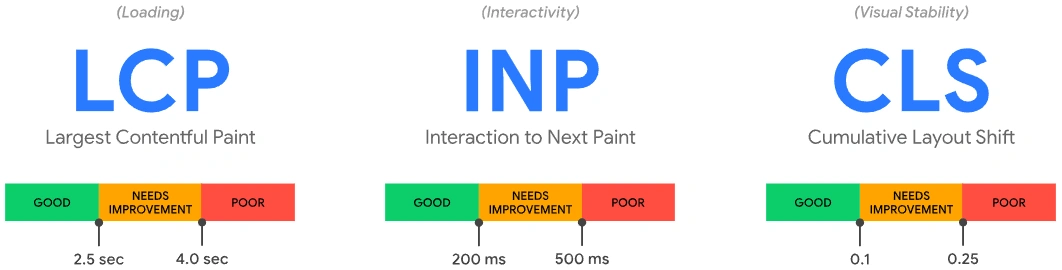
Core Web Vitals are a set of user experience metrics that Google uses to measure real world page performance. The major CWV metrics include:
1. LCP (Largest Contentful Paint)
Measures how fast your main content loads.
Target value: 2.5 seconds or less.
2. FID (First Input Delay)
Measures the initial delay before the browser responds to user actions.
Target value: 100 ms or less.
Note: Google is transitioning from FID to INP.
3. INP (Interaction to Next Paint)
A more accurate measure of total interaction responsiveness.
Target value: 200 ms or less.
4. CLS (Cumulative Layout Shift)
Measures how stable the layout is during page load.
Target value: 0.1 or less.
Core Web Vitals Optimization Strategies That Actually Work
Below are proven and field tested optimization strategies that improve Web Vitals without unnecessary complexity.
1. Reduce Largest Contentful Paint by Optimizing Above the Fold Elements
LCP is usually affected by heavy images, lazy servers and bloated themes.
Effective fixes include:
Serve next gen formats like WebP or AVIF
Compress hero banners without losing visible quality
Preload critical page assets including hero image and main font
Use a fast hosting provider or cloud based hosting
Remove heavy sliders from above the fold
Use optimized CSS and remove unused rules
Improving LCP directly improves user trust and search visibility.
2. Improve Interaction Scores by Reducing JavaScript Execution
JavaScript is one of the biggest reasons for poor INP and FID.
To optimize:
Remove unused JS and plugins
Break long tasks into smaller chunks
Use code splitting
Defer non critical JS
Use server side rendering for dynamic content
Replace heavy libraries with lighter versions such as switching jQuery functions to vanilla JS
Google’s switch to INP makes JS optimization more important than ever.
3. Stabilize Layout to Fix Cumulative Layout Shift
CLS issues often happen due to elements loading or shifting unexpectedly.
Fix them by:
Assigning width and height attributes to all images
Using CSS aspect ratio boxes
Reserving space for ads and iframes
Preloading fonts to avoid flash of unstyled text
Avoiding content injection above existing content
A stable layout improves both SEO and user satisfaction.
4. Use a CDN and Edge Delivery for Faster Global Performance
Content Delivery Networks reduce latency and speed up large assets.
Benefits include:
Global caching for static files
Faster image and video delivery
Reduced server load
Improved LCP and CLS across international traffic
Platforms like Cloudflare, Fastly and BunnyCDN are highly recommended.
5. Optimize Fonts for Faster Rendering
Fonts are often ignored, but they impact both LCP and CLS.
To optimize fonts:
Use modern variable fonts
Preload critical font files
Use font display swap to avoid invisible text
Reduce the number of font weights
Self host fonts instead of relying on third party requests
This results in faster content visibility and more stable layouts.
6. Keep Your Website Lightweight Through Code and Plugin Minimization
Too many apps, plugins and scripts slow down the site.
Best practices include:
Audit plugins every 3 months
Remove outdated themes and scripts
Use a minimal framework or headless CMS
Use lazy loading for images, embeds and videos
Minify HTML, CSS and JS
A lean website loads faster and consistently performs better on Web Vitals.
7. Improve Server Response Time With Caching and Better Infrastructure
Slow servers are the root cause of many LCP issues.
Solutions include:
Install server side caching
Use Redis or Memcached
Upgrade to faster PHP versions
Use lightweight server stacks like Nginx or LiteSpeed
Move to cloud hosting platforms
Optimize databases using indexing and cleanup tools
Better hosting always leads to better performance.
8. Monitor Core Web Vitals Regularly Using Reliable Tools
Continuous monitoring is essential.
Use tools like:
Google Search Console
PageSpeed Insights
Lighthouse
WebPageTest
Cloudflare Analytics
GTmetrix
Track changes after every website update or redesign.
Core Web Vitals are no longer optional. They directly impact SEO visibility, user engagement and conversion rates. By optimizing LCP, INP and CLS using the strategies above, your website can achieve long term performance stability and better rankings in 2026 and beyond.
If your site needs a technical SEO audit or Web Vitals optimization, WaffleBytes can help you implement these improvements effectively.
